.png)
Daily UI Challenge
This challenge is to create 30 different UI Screens, Images, or Logos. I started this challenge on January 31, 2021 and here is where I'm at so far. I'm tweeting out each DailyUI screen as I go. Check my Twitter to get caught up. I'll upload all my screens here when I can, but Twitter will have my current day.

001: Sign In Page

002: Payment Screen
I subscribed to DailyUI and they are provided the topics for my challenge via email. I am looking forward to this challenge to gain experience and try out some new ideas. We'll see where this takes me.

003: Landing Page

004: Calculator

005: App Logo
The Sketch app is the main tool I use to create my designs. I have all my DailyUI designs in one place. I also have huge drawing board where I do the majority of the work.
My inspiration comes from many places on the internet and my life. From Dribbble to Twitter to simply Googling a UI design, I find ways to make the screens my own. These designs are originals and fit into a their own custom style.
I try to imagine each screen has a unique color scheme, feel, and theme and I'll bring that out with font, size, spacing, shadows, and feel. Stay tuned in, I'll be updating my website every weekend until I hit 100.
Tools and Inspiration

011: Flash Messages

010: Button

006: User Profile

008: 404 Page

007: Settings Page

009: Music Player on Watch

013: Direct Messaging
Trends and Style
I find inspiration for my designs all over. From flipping through projects on Behance, Dribbble and Google search I find a style to model my design in. All my designs are original, but I do inspect the work of others quite often. I use the pieces I like and leave the rest. I'm still working on the 3D UI trend that's popular right now.

015: Toggle Switches
012: eCommerce Store

012: eCommerce Item


014: Timer
016: Pop Up

019: Video Game Ranking

021: Home Monitoring App

017: Email Receipt
.png)
018: Activity Tracker

020: Map/Navigation

022: Search Engine


023: Onboarding

New Tools
Most of the projects above this point were designed using Sketch, BUT the two most recent designs, were created in Figma. That's 023 and 024. I'm loving Figma, but missing a few things that Sketch has. The biggest improvement overall is the prototyping in Figma. Also I just started using Adobe XD as of July 2021. I'm excited to get started learning it.
Designs 025 and 026 were created in XD.
Interestingly, after going through the struggle of learning one design program and switching to another makes the learning curve so much easier. At the moment I can't decide which I like the best. I'm just loving the new job and can't wait to learn some more stuff.
024: Boarding Pass

025: TV App

026: Subscribe

028: Contact Us Form

029: Mobile Map
Feeling Inspired
I've recently gotten inspired to continue this Daily UI journey.
I just needed to get back to designing! My current work load has been mostly research based. I'm learning a ton, but I do miss the occasional designing session.
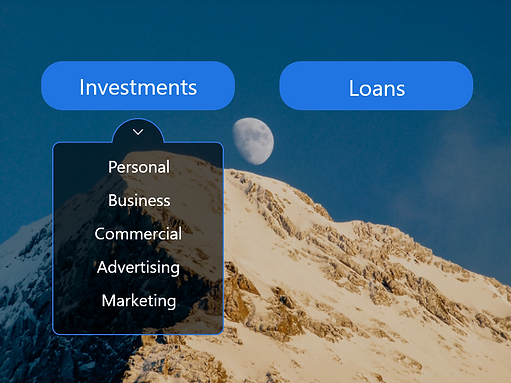
027: Dropdown Menu